Built for small teams and solo devs

Turn application events into useful analytics.

Send events as JSON over HTTP. Postcone manages the storage, adapts as your data changes, and gives you suggested visualizations plus direct SQL access. No database, queue, or analytics server to deploy.

One event or a batch · Name a table, no schema to define

import { Postcone } from "@postcone/node";

const postcone = new Postcone(process.env.POSTCONE_API_KEY);

await postcone.send("analytics.agent_runs", {
  run_id: "run_8f3a",
  agent: "research-bot",
  duration_ms: 1850,
  status: "success"
});

SDK preview · Proposed API, not currently available

analytics.agent_runs is the destination table you name. Sending its first event creates the table and its schema automatically.

Destination table

analytics.agent_runs

Created automatically on first event

Schema

Managed as events evolve

Full source JSON retained

Understand

Suggested views + direct SQL

What your fields mean

End to end

One request in. A queryable table and suggested visualizations out.

Simulated — not a live API call.

Ingest

Single events or batches

Organize

Tables + evolving schemas

Interpret

Figures out what columns mean

Understand

Suggested views + direct SQL

The problem

You already have the data.

You shouldn't need a data platform team to use it.

Event analytics often starts with one endpoint and becomes a queue, schema system, storage pipeline, table catalog, query engine, cache, and visualization layer. Postcone manages that path as one service so a solo developer or small product team can stay focused on the application.

Build the stack

Ingestion APIQueueSchema jobsObject storageParquetCatalogQuery engineCacheCharts

Use Postcone

One workspace-scoped API

Send the event. Keep building your product.

How it works

Send one request. Postcone handles the layers between event and insight.

Your application emits ordinary JSON. Postcone handles the ingestion, storage, schema, and interpretation work that normally turns event analytics into a platform project.

01
Your application

Send events

Your application sends authenticated HTTP requests containing one event or a batch. The analytics.agent_runs path names the destination table. You don't create it first — Postcone creates the table, and its schema, when the first event arrives.
02
Managed infrastructure

Postcone runs the data path

Postcone handles authenticated ingestion, buffering, analytical file creation, table storage, and publication. Your product team doesn't have to operate those systems.

03
Evolving schema

Event shapes become managed schemas

Incoming events are examined to determine the table's columns and types. As new fields appear, Postcone evolves its schema understanding additively while retaining the complete source JSON and keeping older events available.

04
Interpret

Postcone infers what the data means

Postcone combines column names, physical types, statistics, and sample values to work out what each column actually represents. That way, duration_ms: long reads as a latency measurement, not a currency amount, a status code, or a generic number.

05
Understanding

Start with relevant suggested analysis

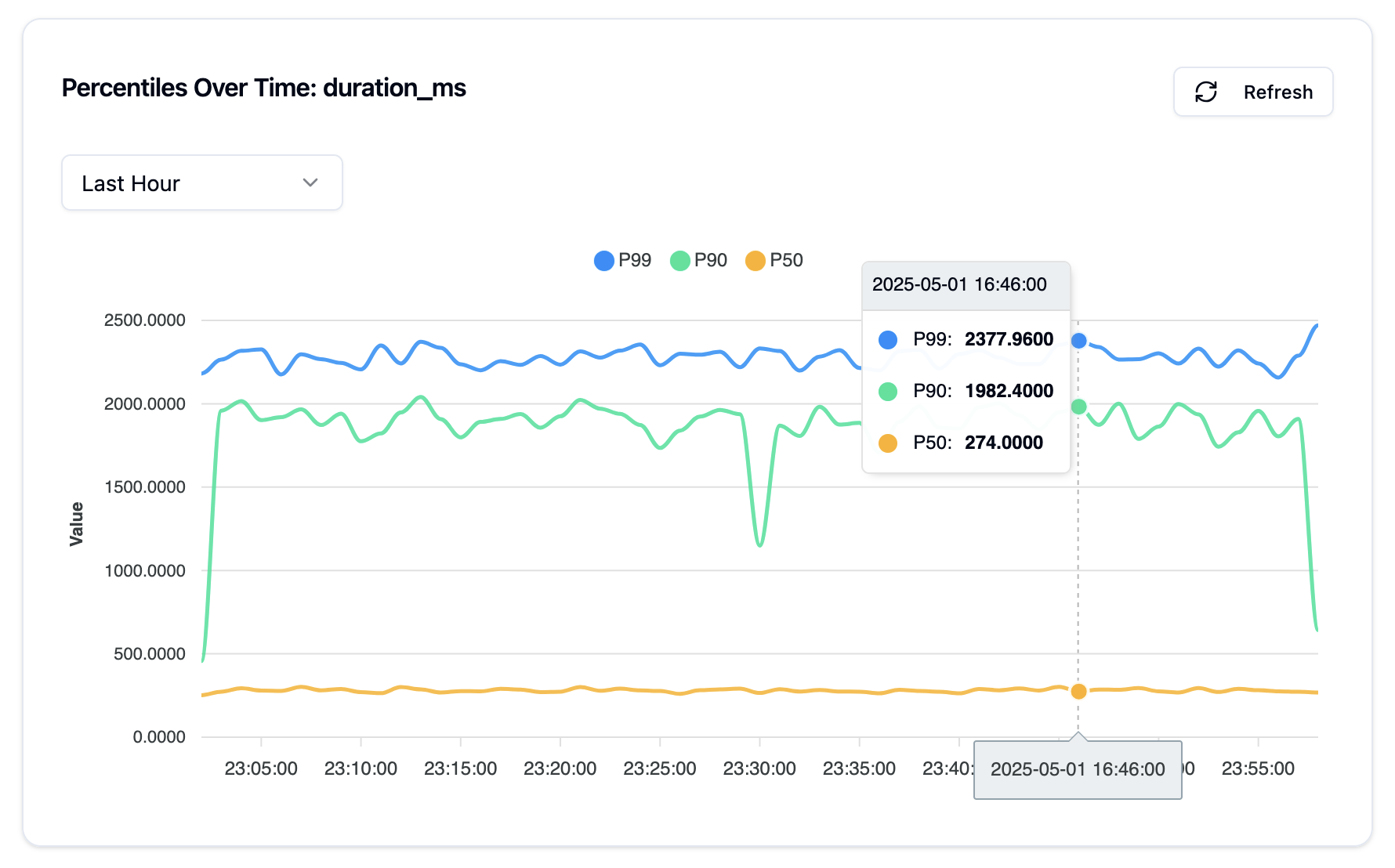
Postcone uses what it figured out to suggest visualizations that fit, such as latency percentiles over time. You can explore the first result without writing a query, then use SQL whenever you need to inspect the underlying events or go deeper.

Start with suggested views. Go deeper with SQL.

From an evolving schema to analysis that fits the data.

Postcone tracks your schema as event shapes change, then analyzes column names, types, statistics, and sample values to infer what those columns represent. Start with the resulting visualization suggestions without writing a query. When you need to inspect or analyze the underlying events directly, drop into read-only SQL.

query.sql Read-only SQL
SELECT
  agent,
  count(*) AS runs,
  percentile_cont(0.95)
    WITHIN GROUP (ORDER BY duration_ms) AS p95_ms
FROM analytics.agent_runs
GROUP BY agent
ORDER BY runs DESC;
Suggested percentile-over-time view for agent-run duration, showing P50, P90, and P99
Suggested percentile view, generated after Postcone spotted duration_ms as a latency field. Processing runs asynchronously on a freshness window you configure, from seconds to hours.

Why Postcone

Keep the data. Skip the platform project.

Skip the data warehouse infrastructure

Go from an HTTP request to managed analytical storage without operating a custom pipeline.

Let event shapes evolve

Postcone manages inferred columns and types as fields appear while preserving every source event.

Start with views that fit your data

Get a useful visual starting point without writing a query.

Go deeper with familiar SQL

Inspect and analyze event tables directly when the suggested views aren't enough.

Use cases

What is normally sent to the Cone?

Send ordinary JSON shaped around your application's own data model. Postcone automatically adapts the managed schema and analytical infrastructure as your events evolve.

API activity and latency

Track requests, response times, status families, endpoints, and domain-specific outcomes.

Background operations

Understand job duration, retries, completion, failures, and the quality of generated output.

Product and business events

Explore searches, recommendations, transactions, conversions, marketplaces, and custom workflows.

Agent and model runs

Analyze tools, tokens, duration, outcomes, model versions, and application-specific quality signals.

Compare approaches

Different tools optimize for different jobs.

There are good reasons to choose every option below. Compare where each approach is strongest, the tradeoffs it introduces, and where Postcone's narrower path fits — and where it doesn't.

Compare Postcone with:

Option: Build it yourself

Maximum control over the complete stack

An open, self-managed stack can be shaped precisely around your workload, security model, infrastructure, and performance requirements.

Why teams choose it

  • Choose every storage, compute, and query component
  • Tune performance and reliability for a unique workload
  • Keep infrastructure and operational control in-house

Tradeoffs to consider

  • Build and integrate ingestion, buffering, storage, querying, and visualization
  • Own upgrades, recovery, observability, and on-call responsibility
  • Invest more engineering time before the first useful analysis

Best fit

Control, customization, compliance, or specialized performance outweigh the engineering cost.

With Postcone

More time for the product you actually want to build

One API instead of an ingestion, buffering, storage, query, and visualization stack you assemble yourself. Nothing to upgrade, recover, or carry a pager for.

  1. 1 Send a JSON object or batch over HTTP
  2. 2 Let Postcone run the ingestion, storage, and query infrastructure
  3. 3 Keep the table schema aligned as event shapes evolve
  4. 4 Work out what your columns actually represent
  5. 5 Start from suggested visualizations, then use SQL for deeper analysis

Where Postcone fits

A good fit when getting to answers matters more than assembling or customizing every layer yourself.

Postcone tradeoff

Postcone provides less control over component choices, deployment topology, and low-level performance tuning.

Pricing

Start small. Pay for what you use.

A simple monthly base gives your workspace access to Postcone. Infrastructure usage scales with your workload.

Common event-pricing benchmark

~$0.50/ 1 million events

Many event platforms quote pricing this way, so here's the comparison. Postcone bills the infrastructure units below rather than a flat per-event rate, which works out to about this for a typical workload.

Base access

One workspace, one monthly base

$10/month

Plus usage

Compute

$0.10

per compute hour

Billed to the millisecond

Storage

$0.023

per GB-month

Egress bandwidth

$0.01

per GB of egress

Storage operations

Class A

$0.05

per 10k ops

Class B

$0.005

per 10k ops

We meter usage from actual infrastructure consumption. Your cost depends on event size, retention, query activity, and workload.

Your first event is enough to start

Go from JSON to a queryable analytical table in minutes.

Create a workspace, name a destination table, and send the application event you already have. Postcone creates and manages that table for you.